How do I track orders?
Orders in the navbar opens Order Management: every order your company has placed, from the moment it goes to the retailer until it is received.
An order exists only once a request has been approved and confirmed. A purchase still waiting for that is a request — "find it under Assets → Requests". See How does an approved request become an order?.
Before you begin
You need Admin access and the store:admin permission. Employees have no order list; they follow their own requests instead.
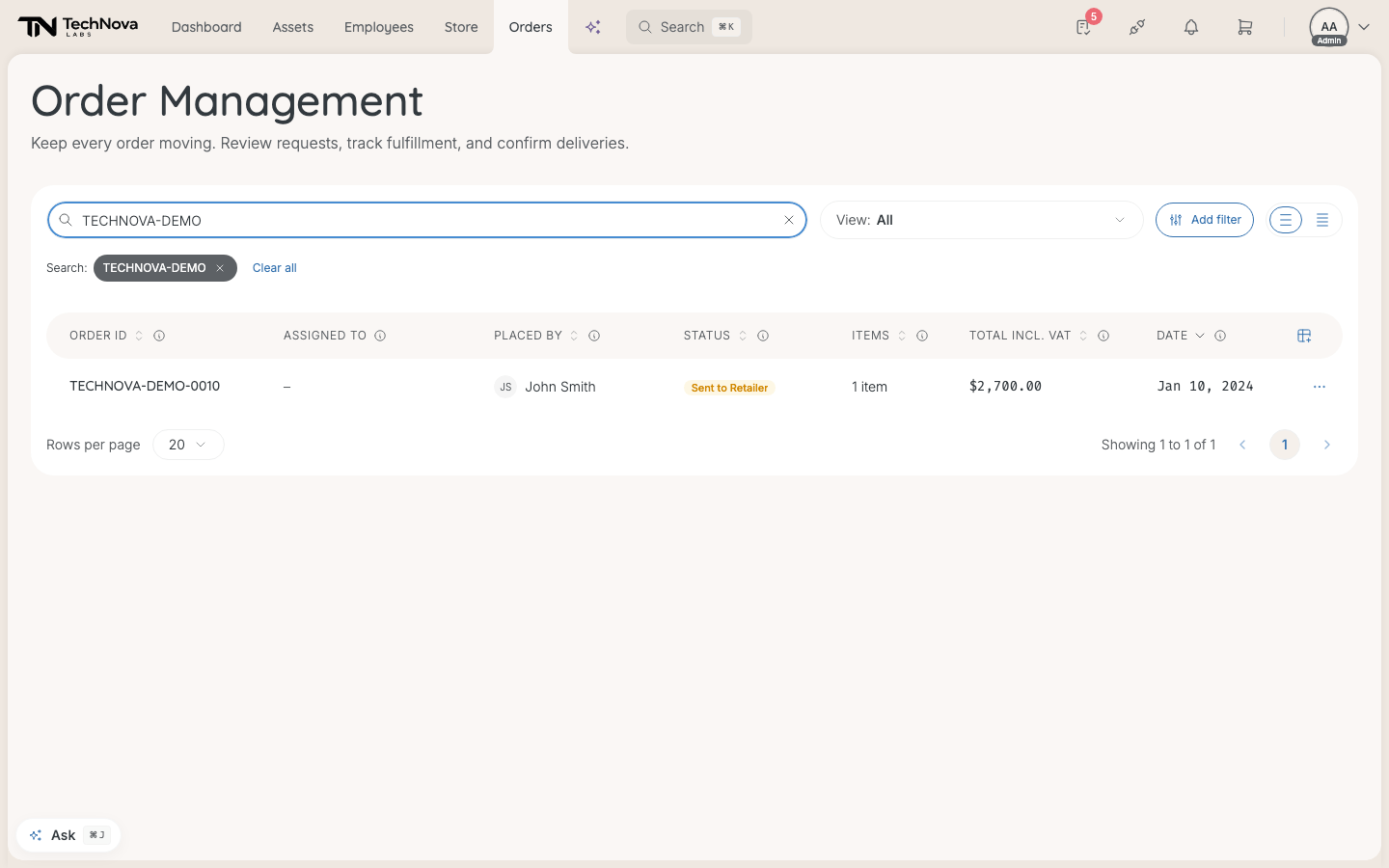
The list
| Column | Shows |
|---|---|
| Order ID | The order number. Select it to open the order |
| Assigned to | Who the hardware is for. Often "–": only orders placed for several people from the Store record this |
| Placed by | Who placed it |
| Status | Where it is — see below |
| Items | How many items |
| Total incl. VAT | The total. Total excl. VAT can be switched on from the column menu |
| Date | When it was placed |
Search order number... finds an order by its number. View and Add filter narrow the list by status.
Statuses
| Status | Meaning |
|---|---|
| Sent to Retailer | Approved and sent. The retailer has not confirmed it yet |
| Retailer Processing | The retailer has accepted it and is preparing it |
| Backordered | The retailer is waiting for stock |
| In Transit | Shipped |
| Partially Delivered | Some items have arrived |
| Delivery Failed | The delivery did not succeed |
| Delivered | Reported as delivered. Nobody has confirmed it yet |
| Confirmed Received | Someone confirmed it arrived |
| Completed | Everything on the order is received or settled |
An order with several items shows the status of the item furthest behind — one item still in transit keeps the order at In Transit. A problem shows first: Delivery Failed, Partially Delivered and Backordered outrank everything else.
What moves an order on
- The retailer reports when it accepts, backorders and ships an order, with tracking. Most retailers never report that a parcel arrived.
- The person who received it, or an admin, confirms that it arrived. That is what moves it to Confirmed Received — from In Transit or Delivered. See How are deliveries received and turned into assets?.
- Completed follows on its own once every item is settled.
Good to know
Why do so many orders sit at In Transit?
Because the retailer reported the shipment and nobody has confirmed the arrival yet. Velory reminds the recipient on weekdays, but someone has to confirm.
Can I cancel an order?
Not in Velory. Once an order is placed, contact the retailer. Before that, cancel the request instead.
Can I save a view?
No. View offers one preset per status, but you cannot save your own.
Was this article helpful?