How do I track software costs and renewals?
Velory helps you track what your company spends on software — across services, plans, and individual licenses. You can see monthly costs at a glance, identify unused licenses, and stay ahead of upcoming expirations.
In this guide
Before you begin
You need Admin or Manager access to view software cost information.
See your software spend
- Go to Assets → Software.
The service overview table shows a Monthly Cost column for each service — the normalised monthly cost across all active plans, converted to your company's currency.
To see the breakdown over time, click View spending at the top of the page.
The Software Spending page
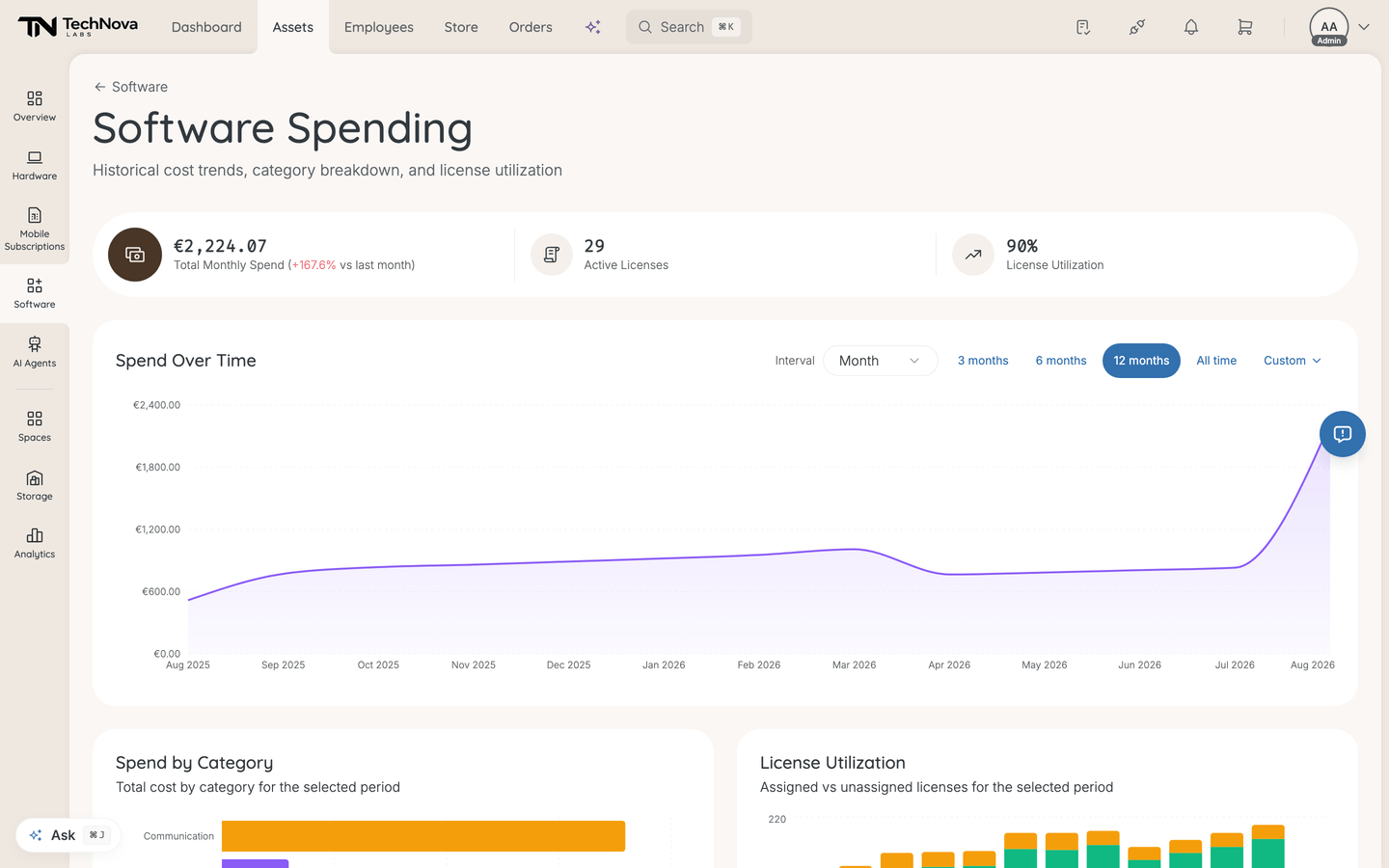
Software Spending covers historical cost trends, category breakdown and licence utilisation. Three figures sit at the top: Total Monthly Spend, with a comparison against the previous period; Active Licenses; and License Utilization as a percentage.
Two controls change everything below them:
- Interval — Day, Week or Month, setting the granularity of the trend
- Time range — 3 months, 6 months, 12 months, All time, or Custom with your own From and To dates
Then four charts:
| Chart | What it shows |
|---|---|
| Spend Over Time | The cost trend across the selected period at the selected interval |
| Spend by Category | Total cost by category — where the money goes by type of tool |
| Top Services by Cost | Total cost per service, ranked |
| License Utilization | Assigned versus unassigned licences over the period — the waste picture |
The figures come from a snapshot Velory captures once a day. Opening the page refreshes the snapshot if it is more than a minute old, so what you see is current without you having to do anything.
If you pick a long range at Day granularity, Velory warns that older data was trimmed and suggests switching to Weekly or Monthly. Switch the interval rather than narrowing the range — the trimming is a display limit, not missing data.
Understand how costs are calculated
Costs are set at the plan level and depend on the cost type:
| Cost type | How it works | Example |
|---|---|---|
| Flat Charge | A fixed amount per billing cycle, regardless of licence count | A team plan at $200/month stays $200 whether you have 5 or 50 licences |
| Per User | The cost is multiplied by the number of active licences | A plan at $15/user/month with 20 licences costs $300/month |
| Pay Per Use | Billed on actual consumption. The plan has no fixed monthly figure — spend accrues as usage data arrives | An AI service billed per token |
All costs are normalised to a monthly figure and converted to your company's currency:
| Billing cycle | Contribution to the monthly figure |
|---|---|
| Monthly | The cost as entered |
| Quarterly | Divided by 3 |
| Yearly | Divided by 12 |
| One-time | The full amount, not spread out |
| Perpetual | The full amount, not spread out |
The last two are worth reading twice. A one-time or perpetual plan contributes its entire cost to the monthly figure rather than being amortised, so a one-off $12,000 purchase reads as $12,000 of monthly spend for as long as the plan is active. If your monthly total looks far too high, a one-time plan is the first thing to check.
Pay Per Use spend
A Pay Per Use plan shows Accrued spend for the current month on its Finance tab, along with which members generated it. This requires usage telemetry for that service — until usage data lands, the accrued figure stays empty and the plan contributes nothing to the monthly total.
Track expirations and renewals
Expiration dates are set on individual licences, and the licence table highlights the ones approaching: red once a licence has expired, orange when it expires within 30 days. Use the Expires column and the licence filters to find them.
For planning ahead, use the Renewal Calendar instead. Go to Assets → Overview and open the Renewal Calendar tab. It lists contracts and licences expiring in the next 120 days, in either a list or a timeline view.
The calendar rolls licences up by plan rather than listing every seat, using the earliest expiration on the plan and showing how many seats it covers. It separates Auto-renewing subscriptions — which will charge you again unless you act — from Contract ending items, and flags urgency as Critical, Warning or Upcoming (60–120d). You can filter it to Software alone, or include hardware and mobile subscriptions.
Find unused licenses
On the software overview page, the No. of Unused Licenses column shows how many active licenses per service are not assigned to any employee — the quickest read on where you are paying for seats nobody holds.
Tracing that down to individual licences, and telling it apart from seats people hold but never use, is covered in How do I find and reclaim unused licences?.
Good to know
How do I change the cost of a plan?
Open the service detail page, go to the Plans tab, and click on the plan to edit its cost, billing cycle, or cost type. Changes apply to the monthly cost calculation immediately.
Can I track costs in different currencies?
Yes. Each plan has its own currency setting. Velory converts all costs to your company's configured currency for the overview and stats. The original currency is preserved on the plan.
How do I export cost data?
Use the Export button on the software or license list to download the current view as a CSV file. The export respects your active filters, so you can export specific subsets.
What about one-time and perpetual licenses?
Both are supported for plans covering a single purchase, such as a lifetime licence. Be aware that they are not amortised: the full amount counts towards the normalised monthly figure for as long as the plan is active, as described above.
If a one-off purchase is distorting your monthly spend, the options are to set an End date on the plan so it stops counting, or to record the purchase outside a recurring plan.
Why doesn't my Monthly Cost column match the sum of my plan costs?
Three things commonly explain a gap:
- Currency conversion. Plan costs are converted to your company currency using the latest available rate, so a plan priced in another currency will not add up to a round number.
- Per User plans multiply by the current active licence count, which changes as you assign and remove seats.
- One-time and perpetual plans contribute their full amount, as above.
Where do the spending charts get their numbers?
From a daily snapshot of your plan and licence costs. Because the history is built from snapshots, changing a plan's cost today does not rewrite past months — the trend shows what you were actually paying at the time, which is the point of it.
Was this article helpful?