What is SaaS Discovery?
SaaS Discovery finds the software your organisation actually uses, including the tools nobody told you about. It reads sign-in and access records from the sources you have connected, groups them into one row per service, and matches the accounts it finds against your employees.
The result is a list of services with an honest answer to three questions: who is using this, do they have a licence for it, and did anyone approve it.
In this guide
Before you begin
You need Admin access to open SaaS Discovery. Making decisions about a discovered service — managing, monitoring, ignoring or retiring it — needs software creation rights.
You also need at least one source sending data. Discovery has nothing to show on its own. See How do I turn on SaaS Discovery?.
Where to find it
Go to Assets → Software and click SaaS Discovery in the page header. Discovery is a page of its own, alongside Software rather than inside it.
What counts as a discovery
Velory records a signal whenever a connected source reports that someone reached a third-party service. In practice that means:
- Single sign-on logins — someone signed in to a service using their work account
- OAuth grants — someone authorised a service to access company data, and which permissions they granted
- Standing access tokens — a service still holds access, even though there is no recent activity to timestamp
- AI usage — telemetry from AI services reported per person
Signals are aggregated over a rolling 90-day window. A service that stops appearing in that window drops out of the calculation, so the list reflects current use rather than everything that ever happened.
Reading the inbox
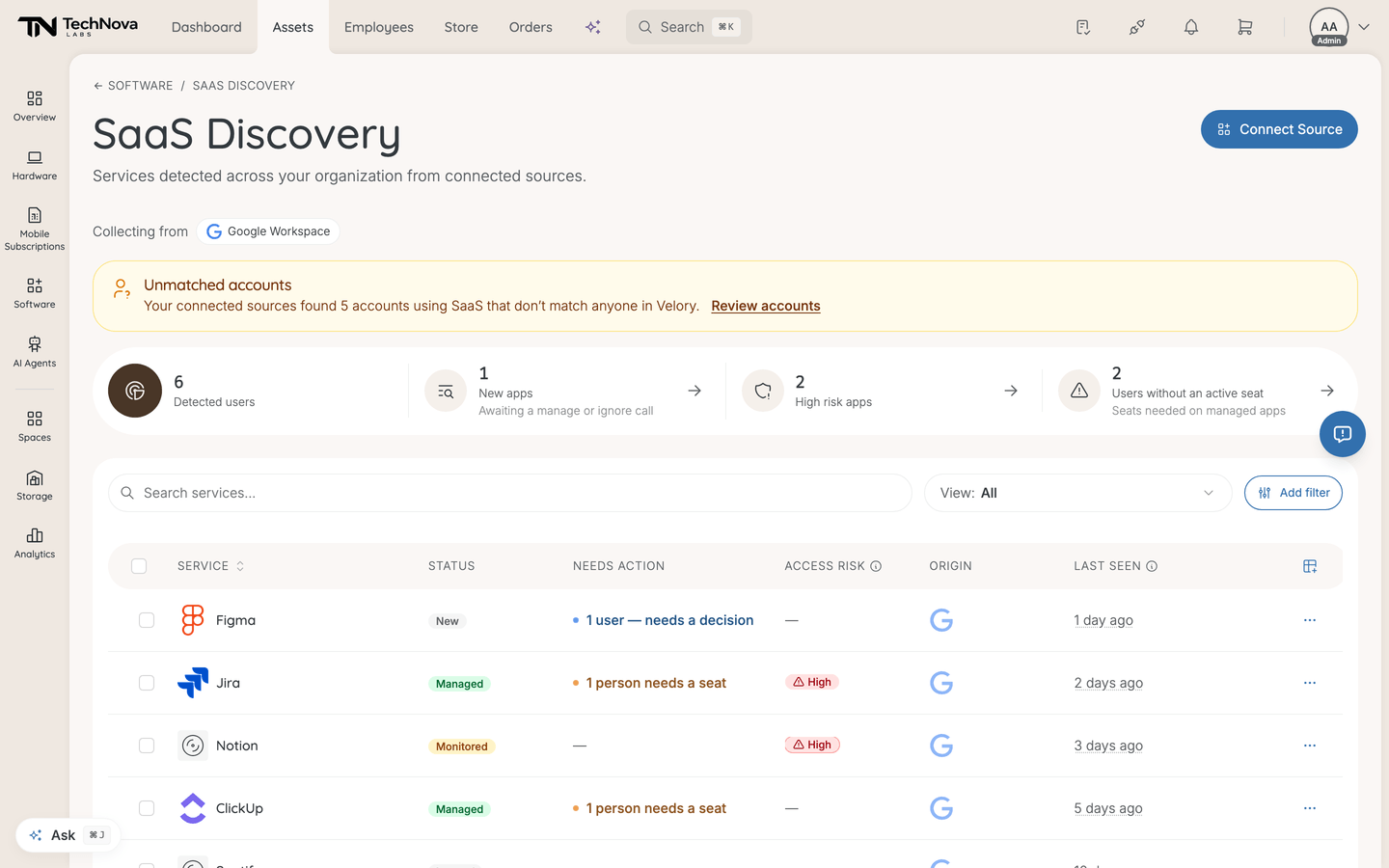
Every discovered service appears in one table, with its state in the Status column. Filter by status to work through one group at a time — New, Managed, Monitored, Ignored or Retired — and save that combination as a view if you return to it often. Filtering to a single status adds a one-line description of what that status means. The statuses and how to move between them are covered in How do I manage, monitor, ignore or retire a discovered service?.
Four tiles sit above the table:
| Tile | What it counts |
|---|---|
| Detected users | Everyone discovery has seen, across all services |
| New apps | Services awaiting a manage or ignore call |
| High risk apps | Services granted the most sensitive permissions |
| Users without an active seat | People using a managed service with no live licence — seats you owe |
The last three link straight to the filtered list, so they work as a starting point rather than only as a number.
A banner above them reports unmatched accounts when there are any — accounts using your software that match nobody in Velory. See Who are unmatched accounts?.
The table columns worth understanding:
| Column | What it tells you |
|---|---|
| Origin | Shadow IT means the service exists in your catalogue only because discovery surfaced it — nobody added it deliberately |
| Coverage | None, Partial or Full — how many detected users hold an active licence |
| Agreement | Whether a vendor agreement is on file for the plan behind this service |
| Access risk | High, Medium or Low |
| Unmatched users | Detected users with no licence for the service yet |
| Last seen | When the service was last used |
| Source | Which connected source reported it |
You can also filter by Access risk, by Catalog (known or unknown service), and by License gap to show only services that have users without an active seat. Saved views and column preferences work the same way as elsewhere in Velory.
Good to know
What does Access risk actually measure?
The highest sensitivity of the OAuth permissions the service was granted. A service that asked to read and write all your Drive files ranks High; one that only read a profile name ranks Low.
It is a measure of what the service can reach, not a judgement of the vendor and not a confidence score for the detection itself. A High-risk service may be entirely legitimate; it holds broad permissions, which is worth knowing either way.
Why does Last seen show a dash?
Some services are known only from a standing access token. The provider confirms the service still has access but reports no timestamped activity, so there is nothing to display. The Active token label appears in place of a time.
Does discovery create licences or cost me anything automatically?
No. Discovery only observes. Nothing is licensed, charged or changed in your Software records until you manage a service, and even then you choose the plan and the seats.
Why is a service missing?
Most likely nothing reported it. Discovery sees what your connected sources see — a tool paid for on a personal card and used outside single sign-on leaves no trace in the sources Velory can read. Discovery narrows the gap; it does not close it.
A service can also be missing because someone ignored it. Filter the Status column to Ignored to check.
Is discovery the same as reconciliation?
No, though they answer similar questions. Reconciliation compares what an integration reports against records you already have, and covers employees, hardware and mobile subscriptions. Software has no reconciliation step — SaaS Discovery is its equivalent.
Was this article helpful?
Related articles