How do I give discovered users a licence?
Discovery tells you who is using a service. Closing the gap between that and who holds a licence for it is the work this article covers.
A service's detail page groups the people it found by why they need attention, so the fix is usually one click rather than an investigation.
In this guide
Before you begin
You need software creation rights.
The service must be Managed and have at least one plan. Licences are only ever assigned through a plan — if the service has none, Velory prompts you to add one in Software first.
The three groups
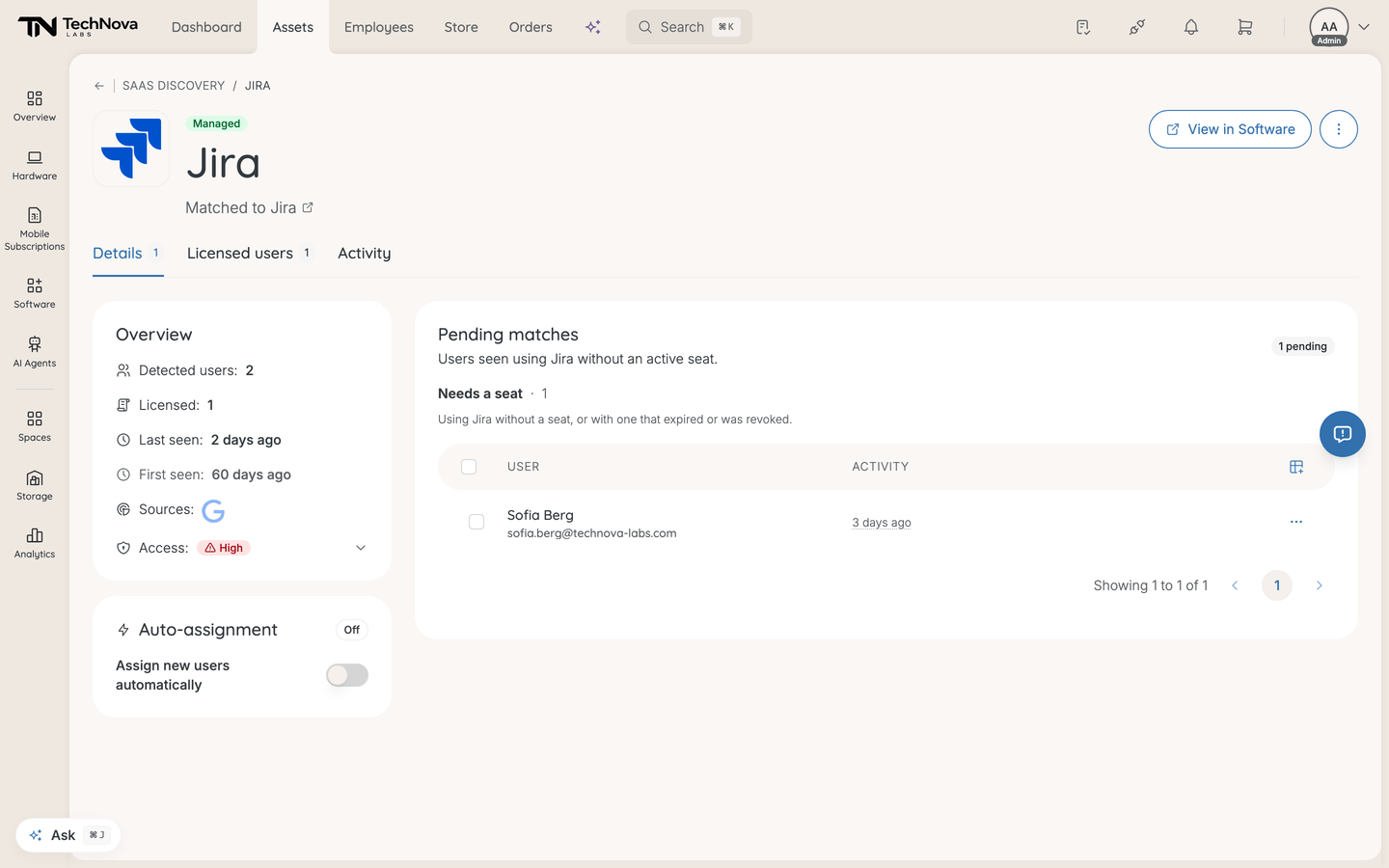
Open a discovered service and look at Pending matches. Detected users without an active seat are grouped:
| Group | What happened | Fix |
|---|---|---|
| Needs a seat | Using the service with no licence at all, or with one that expired or was revoked | Assign to plan |
| Seat still provisioning | A licence was created but setup never completed — though the usage proves access works | Mark seat active |
| Seat is paused | Someone suspended their licence, but they are still using the tool | Resume seat |
The last two are worth pausing on. Both mean your records disagree with reality: Velory thinks the person has no working access, and the provider says they are using it. Marking the seat active or resuming it aligns the record with what is already true — it does not grant new access.
Assign a seat
- Open the discovered service.
- Select the people you want to license under Needs a seat.
- Click Assign to plan.
- Choose the plan. Free seats are shown per plan — "n seats available", Unlimited seats, or No seats.
- Set the Activation Date if the default is wrong. It defaults to the plan's start date, or today if the plan has none.
- Click Assign.
Velory reuses existing unassigned licences on that plan first and only creates new ones for the remainder, so you do not accumulate duplicate seats.
If you selected more people than the plan has free seats, Velory warns you how far over the limit the assignment goes before you confirm.
Assign new users automatically
For a service you have decided to fund, Auto-assignment removes the recurring triage.
On the discovered service, open Auto-assignment and switch on Assign new users automatically, then pick the plan. The card shows the plan's remaining headroom — either Unlimited seats or the number available.
Turning it on does two things:
- Immediately assigns every pending user who is matched to an employee
- Assigns every new user of that service from then on
The dialog states how many pending users the switch is about to seat, so the immediate effect is never a surprise. The badge on the card reads Active or Off, and the service's timeline records when auto-assign was turned on or off.
Auto-assignment needs both a matched service and a plan. Without them the card tells you which is missing.
Users you do not want to license
Not every detected user should get a seat — contractors, shared accounts, someone who tried a tool once. Use Ignore match on the row. Ignored users move to Ignored matches, out of the pending count, and Restore puts one back if you change your mind.
Licensed users lists detected users who already hold an active seat, with the plan each one is on. That list is your evidence that coverage is real.
Good to know
Why was someone skipped when I assigned seats?
Because they are not matched to an employee in Velory. A licence belongs to a person, so an unrecognised account cannot hold one. Velory skips those rows rather than failing the whole assignment.
Fix it by adding the person — see Who are unmatched accounts?.
What does Coverage in the inbox mean?
How many detected users hold an active licence: None, Partial or Full. Full coverage means everyone discovery can see on that service is licensed. It is the number to aim for on any service you have chosen to manage.
Does "Mark seat active" grant access in the software itself?
No. It corrects the record in Velory. The person already has working access — that is how discovery saw them. Nothing is provisioned in the vendor's system.
Someone shows as using a service after I revoked their licence. Is that a bug?
Probably not. It usually means access still works on the vendor's side: a standing token, a personal account, or a manual step that never happened. Discovery is reporting what the provider tells it. That contradiction is exactly what the Needs a seat group exists to surface — decide whether to license them or remove their access properly at the vendor.
Can I do this from Software instead?
Partly. The service detail page in Software has a Discovered users tab, and the software overview has a Discovered users column plus a filter for services that have users without an active seat. Both link back here for the actual triage.
Was this article helpful?