Who are unmatched accounts?
An unmatched account is an account using your connected software that Velory cannot tie to an employee. Discovery saw the usage and the identifier, but nobody in your employee list matches it.
They are worth reviewing, because an account that matches nobody cannot hold a licence — which means it sits outside every coverage figure and cost calculation you have.
In this guide
Before you begin
You need software creation rights to act on unmatched accounts. Adding accounts as employees creates employee records, so treat it as you would any other employee import.
Where to find them
Go to Assets → Software and click SaaS Discovery in the page header. When there are unmatched accounts, a banner reports the count and links to them; otherwise use the Unmatched accounts link on the page.
The list shows:
| Column | What it tells you |
|---|---|
| Account | The identifier discovery saw — usually an email address |
| Services | Which discovered services this account has used |
| Last seen | Most recent recorded activity, or Active token where the provider reports standing access without a timestamp |
Two tabs: Open for accounts awaiting a decision, Ignored for ones you have dismissed.
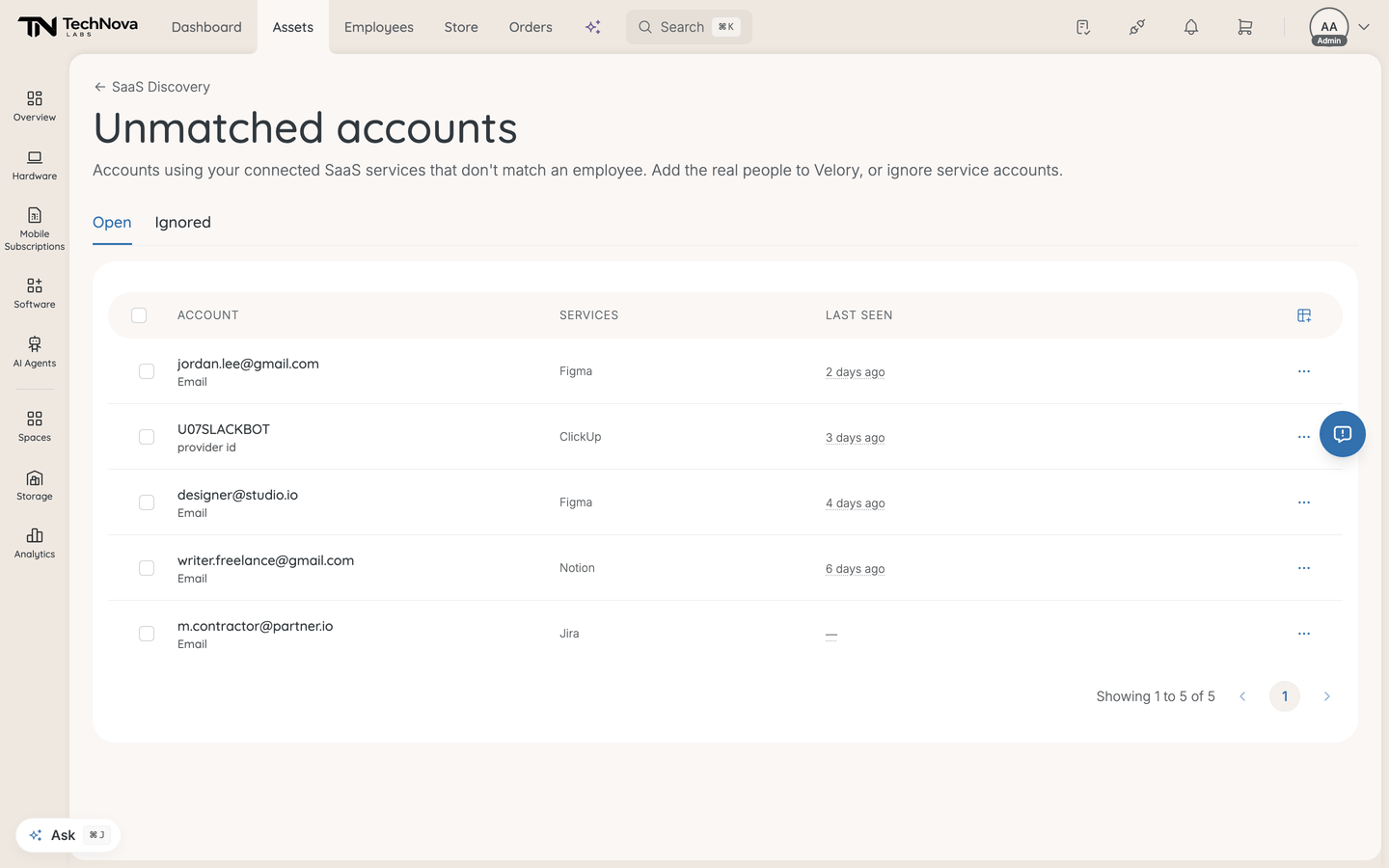
What these accounts usually are
Before acting, work out which kind you are looking at:
- A real person who is not in Velory yet — a new hire, a contractor, or someone who was never added. These should become employees.
- A service or shared account —
builds@,no-reply@, a shared mailbox, an integration's own account. These are not people and should be ignored. - A personal or non-standard address — someone signed in with an address that differs from the one on their employee record. Fixing the address on the employee record is usually better than creating a second person.
Add real people to Velory
- Select the accounts that belong to real people.
- Click Add to Velory.
- Read the confirmation — it states how many employees will be created.
- Confirm.
Velory creates one employee per selected account and derives a provisional name from the email address. Provisional means exactly that: go and correct the names afterwards, because an address rarely produces the name you want to see in reports.
Accounts with no email address are skipped, and the confirmation says how many. There is nothing to build an employee from without one.
Once someone exists as an employee, discovery can match their usage on the next sync, and they show up under the relevant services ready to be licensed.
Ignore accounts that are not people
Select them and click Ignore. They move to the Ignored tab, out of the banner and out of the open list. Restore brings one back if you were wrong.
Ignoring is the right answer for service accounts. Do not create employees for them — an employee record for no-reply@ distorts headcount, onboarding and every per-person figure it touches.
Good to know
Will adding an account as an employee license them automatically?
No. It creates the employee record only. Assigning seats is a separate decision — see How do I give discovered users a licence?.
The exception is a service with auto-assignment switched on. Once the account matches an employee, the next sync can seat them on that plan automatically. That is the intended behaviour, but worth knowing before you add a batch of accounts.
Someone is in Velory already, but still shows as unmatched.
The identifier discovery saw does not match the one on their employee record. Someone signing in as k.andersson@ while their record says karin.andersson@ matches nothing.
Correct the address on the employee record rather than adding them again. Matching is retried on each sync, so it resolves itself once the addresses agree.
Does ignoring an account hide its usage?
No. The services it used still show that usage. Ignoring removes the account from this list only — you are saying "no person needs creating here", not "discard this data".
Why does an account show Active token and no date?
The provider confirms the account still holds access but reports no timestamped activity, so there is no time to display. The access is real even though the last-used date is unknown.
What happens if I do nothing?
The accounts stay in the list and their usage keeps being counted against the services they use, but they can never be licensed. Coverage on those services will not reach Full while unmatched accounts remain — which is the honest answer, not a defect.
Was this article helpful?