How do I start an offboarding?
An offboarding is a project covering one departure: a last day, a departure type, and a decision for every asset the person holds. It starts from the person's own profile, and nothing happens until you confirm it.
Before you begin
You need Admin access. What each device defaults to comes from the entitlement covering its category, and where returns are sent from your Return policy. See What can I set on an entitlement category?.
Start one
- Go to Employees → Employees and open the person.
- Click Manage in the top right.
- Select Start offboarding.
You land on the new offboarding's confirmation step. Nothing has been revoked, nothing has been decided, and the employee has not been told — the project is created inert on purpose.
The option is offered for anyone who is not already Inactive. Once an offboarding is open, the same menu reads View offboarding instead, and a banner under the profile header links to it as well.
The employees list cannot start one. There is a Start offboarding entry in the row menu and another in the bulk bar; neither works today — the row entry does nothing when clicked and the bulk one tells you it is unavailable. Use the profile.
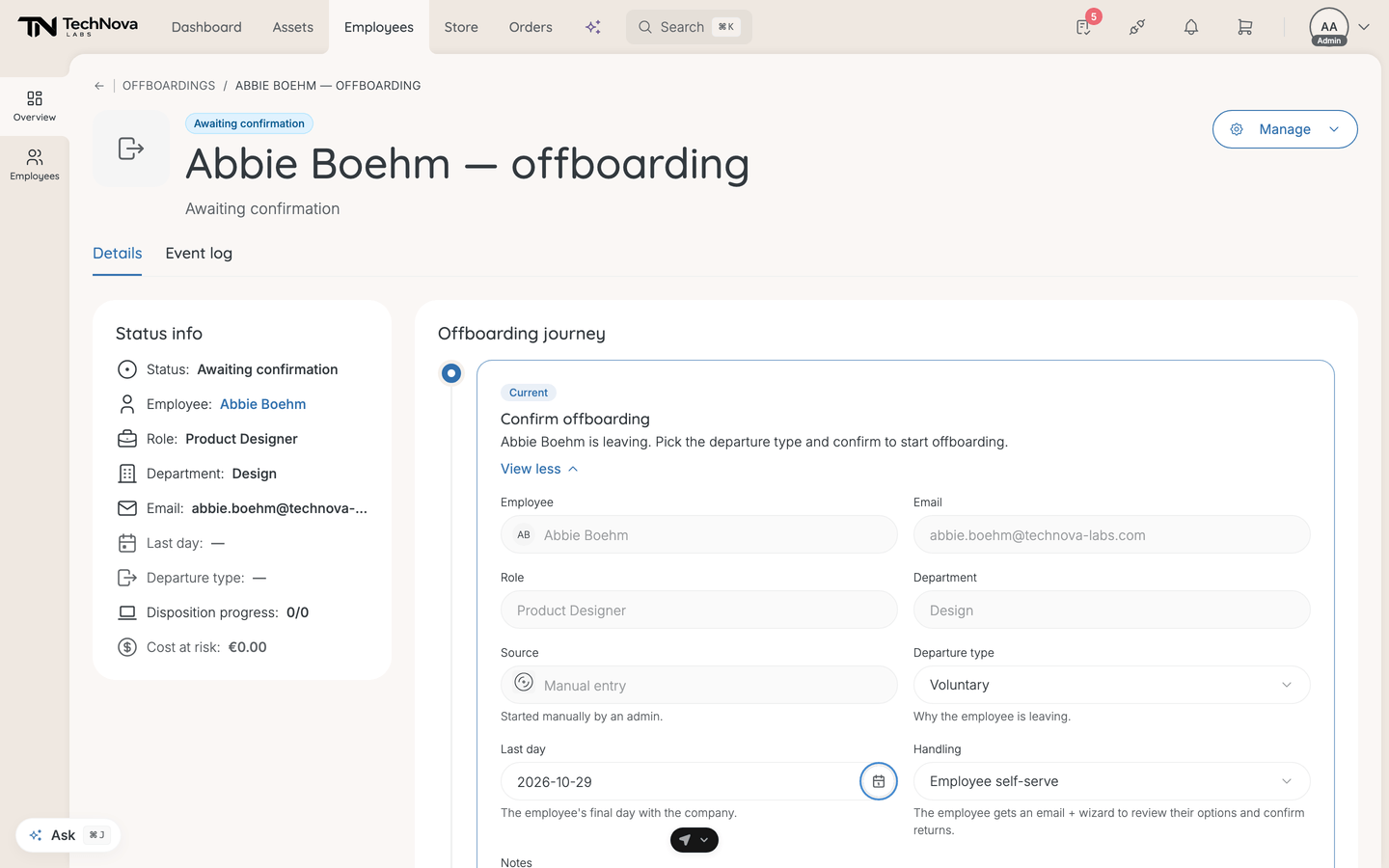
Confirm the departure
The confirmation step collects four things:
| Field | Notes |
|---|---|
| Departure type | Why they are leaving. Required |
| Last day | Their final day. Prefilled and marked as synced when an HR system reported it. Required |
| Handling | Whether the employee resolves their own assets or you do |
| Notes | Optional, for the record |
Confirm & start offboarding stays disabled until the departure type and last day are both set; the step lists what is missing.
Dismiss cancels the pending offboarding with a reason on the audit trail. Nothing happens to the employee, and a departure reported by an HR system will not be re-raised automatically.
The six departure types
Voluntary · Involuntary — with notice · Involuntary — immediate · End of contract · Retirement · Leave becoming permanent.
The type is not cosmetic. It sets the default handling mode, and Involuntary — immediate behaves differently from the rest: access revoke and seat suspension fire automatically on submission, every asset is auto-decided, and the project opens with a banner saying so. Your job there is to review and close.
Who resolves the assets
| Handling | What it means |
|---|---|
| Employee self-serve | The employee gets a wizard to review their options and confirm returns, and an email with the link if your company has switched that email on. Return decisions wait on their response |
| Admin-handled | No email, no wizard. You resolve every asset yourself and nothing waits on anyone |
Both involuntary types default to admin-handled — you do not send a self-service flow to someone being let go. Everything else defaults to self-serve. You can override either at this step.
The journey after confirming
Last day → Set up asset options (or Returns, in admin-handled mode) → Track employee, for self-serve only → Collect returns → Complete.
The sidebar carries the last day, departure type, disposition progress, Cost at risk, status, and the person's role, department and email.
Good to know
Can I offboard several employees at once?
Not today. Each departure is its own project, started from its own profile.
What is "Cost at risk"?
The book value of every asset that has no decision yet. It is a measure of how much of the departure is still undecided, not of how much is physically out of the building — so it falls as you decide items, not as they come back. The same figure reappears on the closing step as the unrecovered book value.
Does starting an offboarding revoke access?
Only for Involuntary — immediate, and only on submission of that confirmation. Every other type revokes software, phone and AI seats on the last day.
Does the employee's status change?
Not by itself. Starting and completing an offboarding leaves the employee's status alone — Velory ships a workflow template that marks someone Inactive at the end of their last day, and whether that runs depends on whether your company has it enabled. If the status matters to you, check the profile, or set it from the employee list. Only Inactive blocks sign-in. See How do employee statuses work?.
An HR system reported a departure — where is it?
On the Transitions tab as a pending offboarding, waiting for the same confirmation. See How do I track every onboarding and offboarding in one place?.
Was this article helpful?
Related articles
How do I configure offboarding?
Admin settings
How do I view and edit an employee's details?
Employee Management
How do I receive returned hardware and close an offboarding?
Employee Management
How do I decide what happens to a leaver's assets?
Employee Management
How do I follow a leaver's own offboarding progress?
Employee Management