How do I set up approval rules?
A rule-set is an approval rule written once and attached to as many policies as you like. It bundles three things: who approves, how long access lasts, and whether a justification is required.
Settings → Policies → Approvals.
Splitting this out of the policy is what stops "needs manager approval, 90 days, justification required" from being retyped fifteen times and diverging.
In this guide
Before you begin
You need Admin access. Create the rule-set before the policy that needs it — a policy cannot be saved without one.
Create a rule-set
- Go to Settings → Policies → Approvals.
- Select New rule-set.
- Choose Applies to: Software services or Hardware store.
- Name it, pick the approval, set the duration and justification.
Applies to is locked
Like a policy's kind, this cannot be changed after creation: "What a rule-set applies to can't be changed after it's created."
A software policy can only use a software rule-set, and a hardware policy only a hardware one. If a policy editor tells you no rule-set exists, you have almost certainly authored one of the wrong kind.
Narrowing a software rule-set to specific services
A software rule-set governs every software request unless you name the services it covers. Services limits it — "Only requests for these services will use this rule-set" — and leaving it empty means all of them.
This is how you express "VP approval for one tool, manager approval for everything else" without authoring two near-identical rule-sets: a narrow one naming that service, and a broad one left empty for the rest.
Hardware rule-sets narrow by asset category instead.
Approval options
| Approval | Who decides |
|---|---|
| Instant | Nobody — the request is granted on submission |
| Manager | The requester's manager |
| Individual approver(s) | People you name |
| Group member approval | Any member of a group you pick |
| Group admin | An admin of the requester's group |
| Group hierarchy approval | Up the group tree |
| Any approver | Any eligible approver |
| Software owner | A steward of the requested service |
| Workflow | A workflow you have built, which runs the approval steps |
Most of these resolve to several possible approvers with any-one-of semantics — the first to approve wins — so needing more than one person is not by itself a reason to reach for a workflow.
Workflow earns its place on sequence and conditions: multi-step chains, conditional routing, a callout to another system. See What are workflows and how do I use them?.
Software owner is the one people overlook: it puts the decision with whoever administers the tool. Note it cannot route hardware requests, and if a service has no steward the request auto-approves rather than stranding.
Duration
Permanent, or temporary with a maximum number of days. Temporary access expires on its own, which is the point: nobody has to remember to take it away.
Justification
Required means the requester must explain why. Worth it for anything expensive or sensitive, and noise everywhere else.
The list
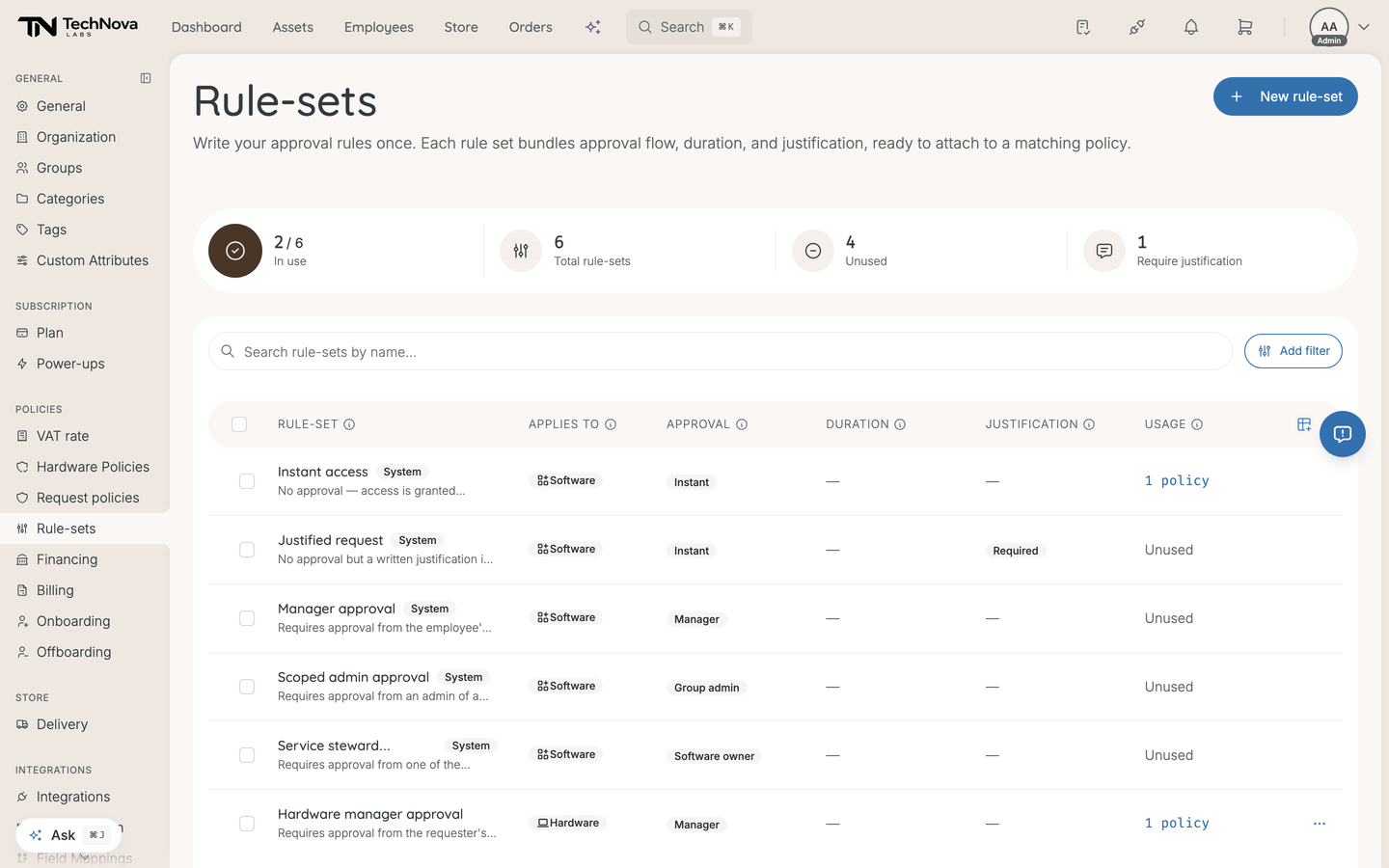
Each row shows applies-to, approval, duration, justification, and a Usage count of how many policies use it. Unused rule-sets are shown as such.
The stats row along the top gives totals: rule-sets in use, unused, and how many require justification. A growing unused count means rule-sets are being created per policy rather than reused — which is the thing this page exists to prevent.
Good to know
Can I change a rule-set that policies are already using?
Yes, and the change applies to every policy using it. Check the Usage count before editing: a rule-set on eleven policies is not the place to try something.
What are system rule-sets?
The list has a System column. System rule-sets ship with Velory, and they cannot be edited or deleted — the attempt is refused outright, and a bulk delete reports them as "system rule sets skipped".
To get a system rule-set with one thing changed, create your own with the settings you want and attach that instead.
An employee matches two policies with different rule-sets
The strictest approval wins. Access adds up across policies; approval does not. For hardware there is one exception: approval is decided per item, and a policy that names the item's category beats one covering all hardware. Priority only decides between policies that are equally specific and equally strict. See Who approves a request?.
Why can I not delete this rule-set?
One of two reasons. It is a system rule-set, or a policy still references it — deletion is refused while anything points at it. The Usage count tells you how many policies to detach first.
Was this article helpful?