How do I set onboarding deadlines and reminders?
The Policy tab under Settings → Policies → Onboarding sets when the onboarding wizard nudges a hire, when it escalates to you, and what happens if the deadline passes with nothing chosen.
These are company-wide defaults, and each role policy can override them later.
One caveat to read first, because the page does not say so: only the red escalation is delivered. An onboarding that hits its deadline with no selection announces itself. The amber warning, the manager copy and the reminder ladder record your intent and send nothing. Details below.
In this guide
Before you begin
You need Admin access. The HRIS-triggered behaviour below only matters if you have an HR integration connected — see How does HR syncing work?.
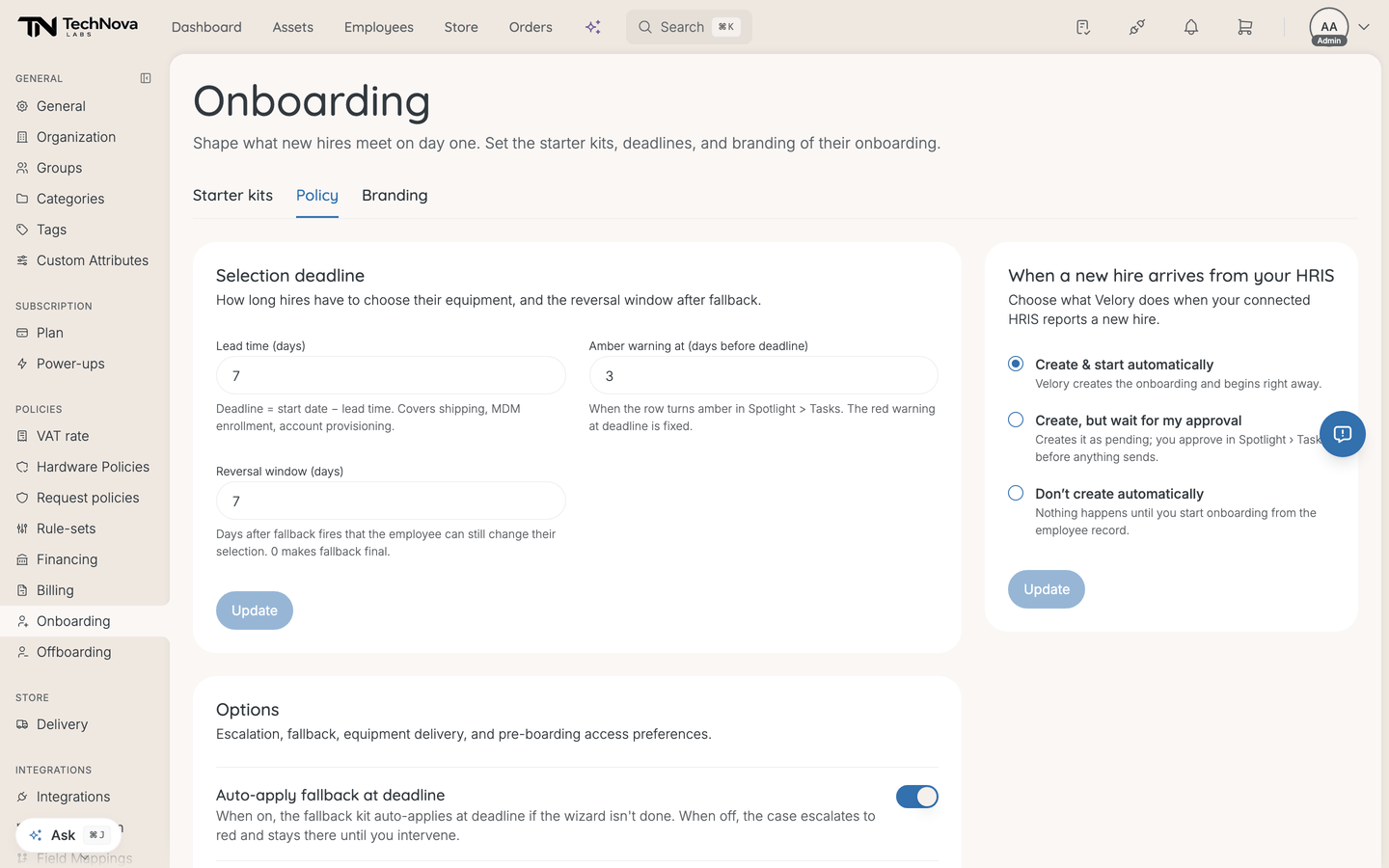
When a new hire arrives from your HRIS
Three choices for what Velory does when your HR system reports a new hire:
| Mode | What happens |
|---|---|
| Create & start automatically | The onboarding is created and begins immediately |
| Create, but wait for my approval | Created as pending; you approve in Spotlight › Tasks before anything sends |
| Don't create automatically | Nothing happens until you start it from the employee record |
Don't create automatically is the default, so a newly connected HR system changes nothing until you say so. Move to wait for my approval when you want to see what the sync would have done before it emails anybody, and to automatic once you trust it.
An onboarding created and started automatically only emails the hire their invite when Invitation to the new hire is switched on in Settings → General → Notifications. It is off until you turn it on. While it is off, those hires wait for you to click Send invite on the onboarding's Employee onboarding step. Invites for onboardings you confirm yourself are not affected.
Who confirms a new hire
Whoever you name here is told when a hire is waiting for confirmation, and whoever confirms first takes ownership of the remaining onboarding tasks — so the pool stops being everybody's problem and becomes one person's.
| Option | Who is told |
|---|---|
| Every company admin | Everyone with company admin access. The default |
| The new hire's manager | The manager on the hire's record. Falls back to every company admin when the hire has no manager yet |
| A specific employee | Only that person |
| A group | Every member of the group |
Two things hold for all of them. Every empty result falls back to company admins — policy unset, the named person removed, a group with nobody in it, even a malformed setting. Over-notifying is recoverable; telling nobody is the failure this design exists to avoid. And the individual and group options need the people in them to hold permission to confirm onboardings — a company admin, or somebody granted it.
The same setting drives who hears about the deadline, about tasks nobody has picked up, and about a hire submitting their choices.
The selection deadline
Lead time (days) sets the deadline: deadline = start date − lead time. It has to cover shipping, MDM enrolment and account provisioning, so it is a logistics number rather than a courtesy — seven days of lead time on a laptop that takes ten to arrive guarantees a late setup.
Velory ships with lead time 7, amber warning 3 and reversal window 7, and Who confirms a new hire set to every company admin. Those are defaults, not examples.
Amber warning at is how many days before the deadline the row turns amber in Spotlight › Tasks. The red warning at the deadline itself is fixed and not configurable. Amber must fire on or before the deadline; the form refuses otherwise.
Reversal window (days) is how long after the fallback fires that the hire can still change their selection. 0 makes fallback final.
What happens at the deadline
What actually happens, in both positions of the switch, is that the hire stops being the blocker: their equipment step unlocks and you confirm, change or skip each item yourself. Nothing is applied for you.
Auto-apply fallback at deadline changes only the wording of the escalation message — on, it says a fallback applies and the run moves on; off, it says the onboarding needs you to step in. The second is accurate either way: nothing substitutes a fallback package.
So treat the deadline as a queue in either case, and read How do onboarding deadlines work? for what you can do once it passes.
Reminders and escalation
Two switches here, and only one of them does anything.
Email admin at red stage works. It defaults to on, and when an onboarding reaches its deadline with no selection from the hire, whoever owns that onboarding is told. Specifics worth knowing:
- Red only. Amber still colours the row for you to find; it does not interrupt anyone.
- Only when the selection never arrived. Submitting the wizard does not close the project — it stays active while provisioning and access grants run — so a hire who chose on time is still in the sweep when the date passes. Those are deliberately left quiet.
- Not at weekends. Notifications are paused Saturday and Sunday, so an onboarding that first turns red then is left alone entirely and picked up by the next weekday sweep rather than announced into a void.
- Once per deadline. Move the start date out and back in and it announces again, because that genuinely is new news.
Copy manager on reminder emails does nothing. There is no reminder ladder behind it, so the manager is copied on nothing. Leave it set if it records your intent; do not rely on it.
Who gets the red message is the Who confirms a new hire setting above, not a separate list. How it reaches them is set on Settings → General → Notifications, under Deadline passed without a choice — in-app only until you turn on Email there. See How do I choose which notifications Velory sends?.
Pre-boarding access
Grant pre-boarding access is intended to queue a "grant access" task per selected scope — Employee portal (onboarding wizard), Training LMS and Company email — so a hire can reach pre-day-one surfaces.
Two things to know. These would be tasks, not automatic grants, so something still has to action them. And like the reminder switches, the preference is stored ahead of the behaviour that consumes it.
Good to know
Does changing the policy affect onboardings already running?
Yes, for anyone still choosing. Hires in pre-selection pick up the change; hires who are locked-in with orders already placed do not. The page counts both before you save.
Where do I watch all this happen?
Spotlight › Tasks. Amber and red states surface there, which is why the amber threshold is worth setting to something you will actually see in time to act.
Can different roles have different deadlines?
Yes. These are the tenant-wide defaults, and a role policy can override them.
Nothing was created when a hire arrived from HR
Check the trigger mode. Don't create automatically means exactly that, and wait for my approval leaves a pending item in Spotlight › Tasks that someone has to approve.
Was this article helpful?