How do entitlements decide what people get?
An entitlement answers one question: what does this group of people get? Hardware, software, mobile and AI agents, per group, in one place. Settings → Policies → Entitlements.
That one answer covers both halves of it — what a new hire is offered on day one, and what an existing employee can request later.
In this guide
Before you begin
You need Admin access. Entitlements apply to groups, so it helps to have your groups set up first. See How do I use groups?.
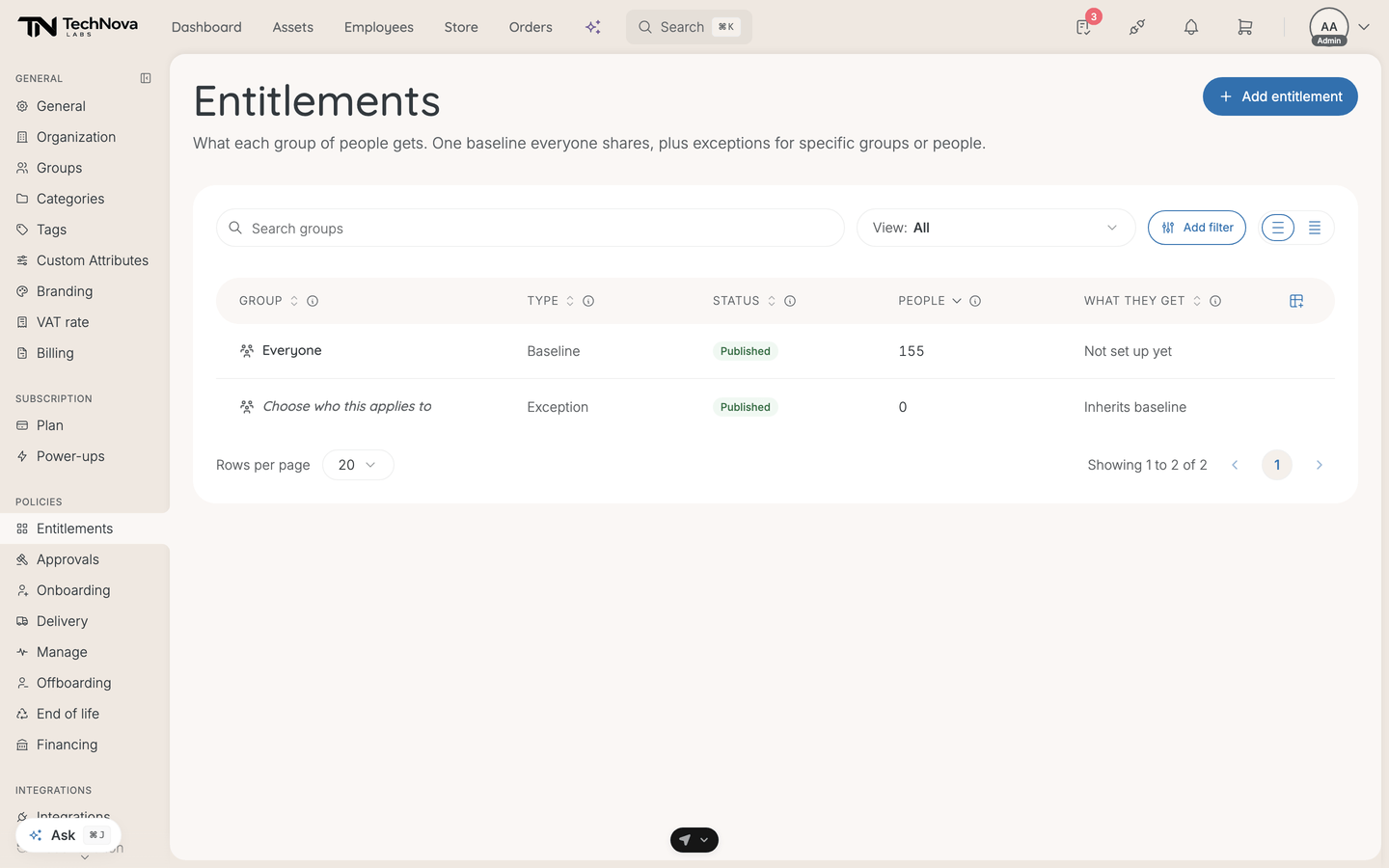
Baseline and exceptions
There are only two kinds of entitlement, and the distinction carries the whole model.
| Type | What it is |
|---|---|
| Baseline | What every employee gets by default. There is one, and everybody inherits it |
| Exception | An override for a specific group, person, or attribute rule |
Start with the baseline. Velory says as much when the list is empty: it is "the shared starting point everything else builds on", and every other entitlement is expressed as a difference from it.
An exception does not restate the whole package. It inherits the baseline and lists only what it changes — the list shows this as Inherits baseline · 2 overrides.
The list
| Column | What it shows |
|---|---|
| Group | Who this applies to. The baseline row covers everyone |
| Type | Baseline or Exception |
| Status | Draft while you set it up, Published when it is live, Archived to retire it |
| People | How many employees it covers. The baseline counts everyone, because everyone inherits it |
| What they get | A baseline shows how many categories it sets up; an exception shows how many overrides it carries |
Not set up yet in What they get means an entitlement exists with nothing configured — it covers people and gives them nothing.
Who an exception applies to
Add on the exception's Applies to panel offers three kinds of target:
- A group — a team, role or department
- An employee — one named person
- An attribute rule — everyone whose employee attribute matches a value, shown as is <values>
A target can belong to only one exception. A group already claimed elsewhere shows as In use by another entitlement rather than letting you create a conflict Velory would have to resolve by guessing.
What is inside one
Open an entitlement and you get Details, a tab per asset type your company uses — Hardware, Software, AI agents, and Mobile subscriptions where mobile is enabled — and an Event log of every change with who made it.
Each asset type is configured as one or more categories, and a category is where the real decisions live: how much, how often, where it comes from, and what happens on day one. See What can I set on an entitlement category?.
Going live with requests
Requests: check & go live compares what each employee can request today against what your entitlement setup would give them, and publishing switches the live request engine over to entitlements.
Run the check before you publish. It is a parity report, and reading it is the point — it tells you who would gain or lose the ability to request something before anybody notices in the wrong direction.
Nothing to publish means no categories are set up yet.
Apply budgets to wallets
Apply budgets to wallets pushes each employee the budget from their most-specific entitlement — their exception if they have one, otherwise the baseline.
It is deliberately narrow: only wallets that differ are touched, and it shows you the split first — how many change, how many are already correct, and how many employees no entitlement covers. That last number is the one to look at. An employee nobody's entitlement covers is not an error Velory can see on its own.
Good to know
Do I have to publish an entitlement?
Yes, for it to do anything. A new entitlement starts as a draft so a half-built exception cannot govern requests and onboarding before you have finished it. Only a published entitlement resolves for anybody.
What happens if I delete one?
Deleting the baseline removes it and its category overrides. Removing an exception makes that group fall back to the baseline and deletes the exception's overrides — the group itself is untouched.
Someone is in two groups with different exceptions
They cannot be. A target can only belong to one exception, and Velory refuses the second rather than picking for you.
Can an entitlement give somebody nothing?
Yes, and it is a legitimate setup — turn the baseline off for a hire at their confirmation step and give them only an exception. It is how you handle a consultant who should not get the standard package.
Was this article helpful?