What do Velory's notifications look like?
Before you switch a channel on in Settings → General → Notifications, you can see here exactly what your people will receive: the in-app row, the email and the chat message for every notification on that page. The wording below is the wording Velory sends. Names, devices and links in the examples are made up.
In this guide
What you can and cannot change
You decide whether a notification goes out and on which channel. You cannot change what it says or how it looks.
- The wording is fixed. No notification on the Notifications page can be reworded, shortened or added to.
- Emails carry Velory's branding. The Velory logo and colours, the same for every company. Your company name appears only in the invitation and hand-back emails.
- Emails come from Velory's sending address, the same for every company.
- Everything is sent in English. There is no setting for a person's or a company's language.
- There is no unsubscribe link in the emails. People manage their own delivery on their notification settings; see How do I change my notifications, password or photo?.
- Chat messages are plain text, with the link written out in full. There are no buttons.
If you want to send something in your own words, a workflow's Send Notification action takes a title and message you write yourself, and can send them in-app, by email and in chat. See What actions can I use in a workflow?.
In-app
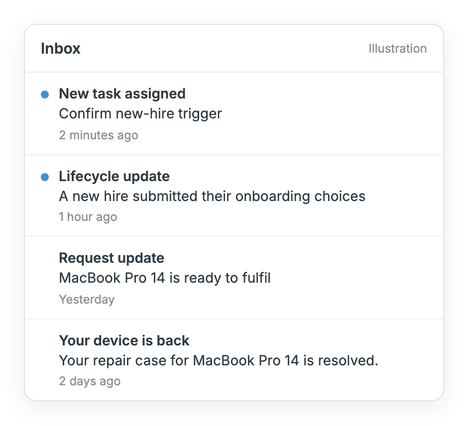
In-app notifications appear under the bell in the top bar. Each is one row: a bold title, one line of text, and when it arrived. Selecting a row opens the page it is about.
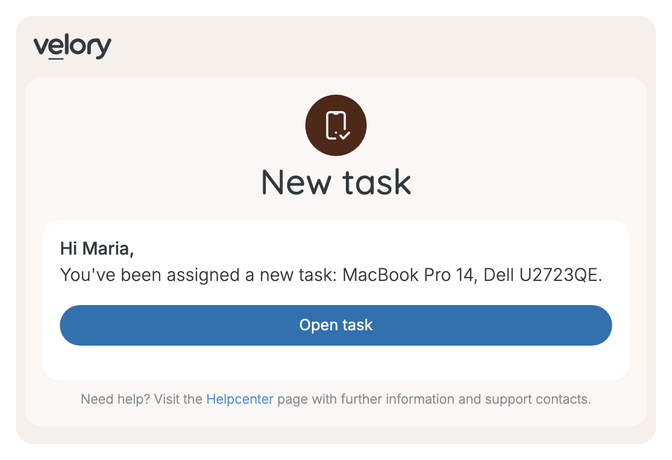
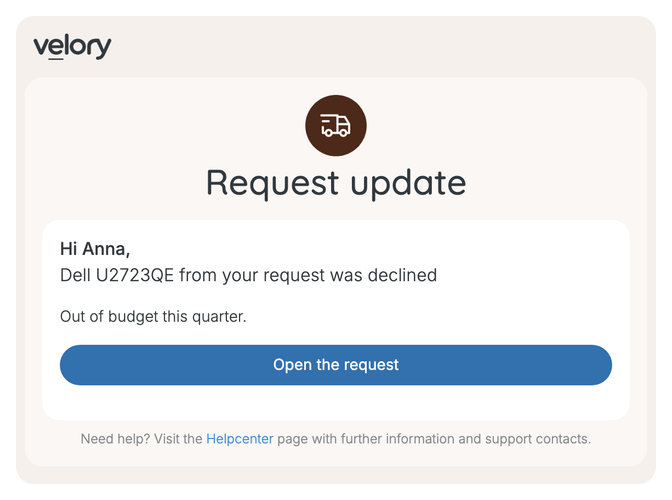
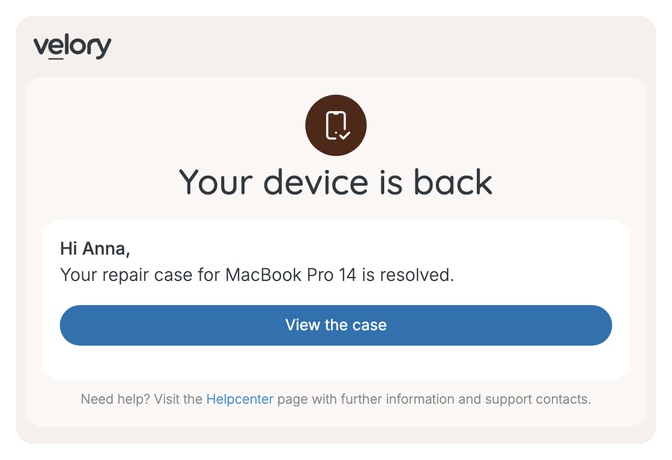
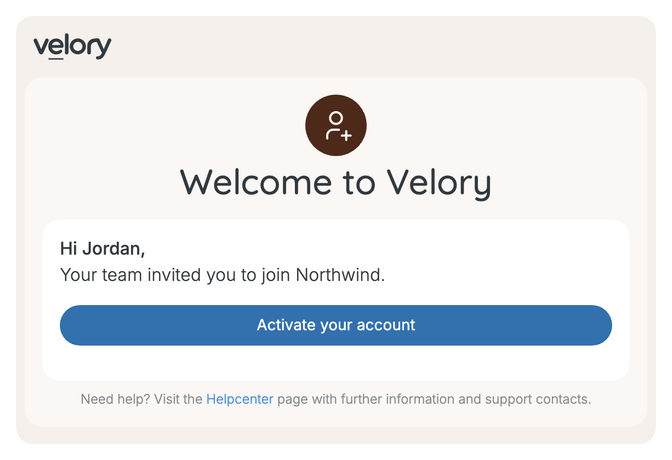
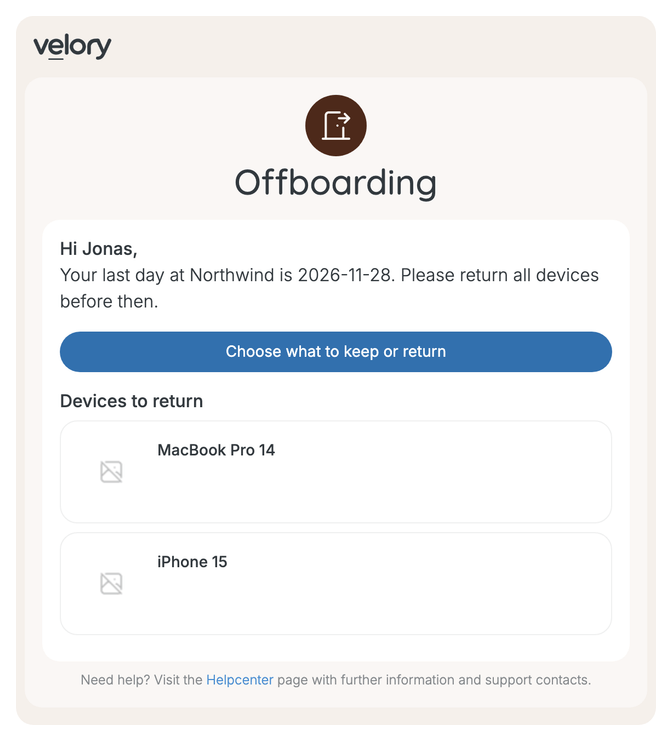
Every email has the same frame: the Velory logo, a round icon and a large heading, a white card with a greeting, the message and one button, then a line pointing to Velory's Helpcenter: Need help? Visit the Helpcenter page with further information and support contacts. Seven templates fill that frame. The tables further down say which one each notification uses.
Task
Several tasks at once
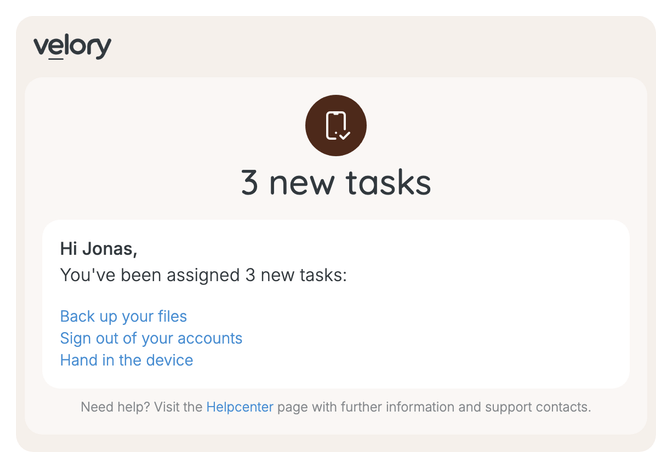
Tasks that reach the same person within five minutes arrive as one email instead of several. Each task name is a link; there is no button.
Lifecycle update
Request update
A reason line appears under the message when there is one — the reason an admin typed when declining or cancelling, or the employee's reason for an early replacement.
Repair update
Invitation to the new hire
When the invite goes out automatically, the inviter is Your team. When an admin sends it, it is that admin's first name.
Hand-back instructions for the leaver
The last day is written as a date in year-month-day form. Every asset the leaver holds is listed by name.
Confirm delivery
This email is the one notification Velory cannot preview here. Turn it on for a single test request first and look at what arrives.
Chat
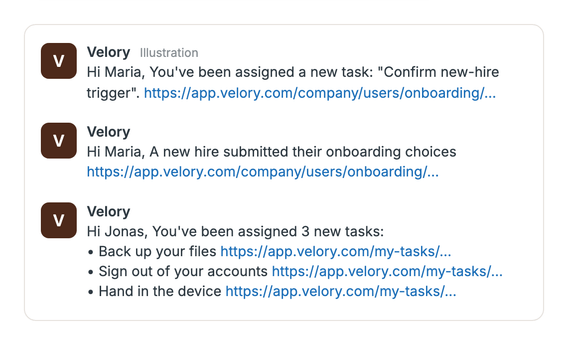
Chat messages go to Slack as a direct message, or to the Microsoft Teams channel the person connected. They start with a greeting, then the message, then the link.
How each template reads on each channel
In the tables below, Message is the text that changes from one notification to the next. This is how each template places it:
| Template | In-app | Email subject | Chat |
|---|---|---|---|
| Task | New task assigned — message | New task: message | Hi Maria, You've been assigned a new task: "message". link |
| Several tasks | One row per task, as above | 3 new tasks | Hi Maria, You've been assigned 3 new tasks: then one line per task with its link |
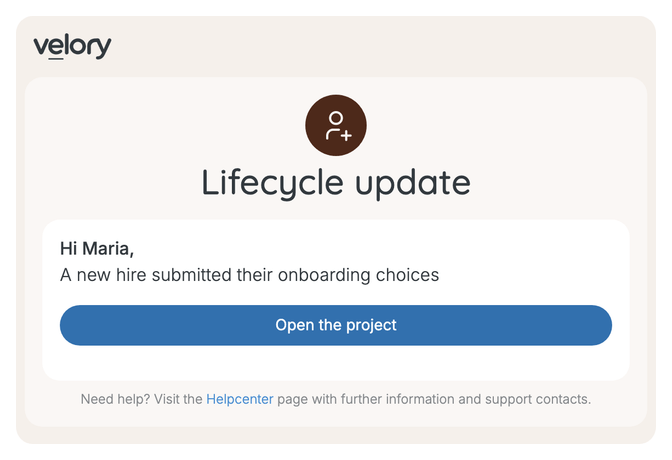
| Lifecycle update | Lifecycle update — message | message | Hi Maria, message, then the link |
| Request update | Request update — message | message | Hi Maria, message, then the reason if there is one, then the link |
| Repair update | title — message | title | message link, with no greeting |
Without a first name on record, the email greeting reads Hi there, and the chat greeting Hi,.
Onboarding
| Notification | Template | Message |
|---|---|---|
| New hire waiting for confirmation | Task | Confirm new-hire trigger |
| Setup tasks without an owner | Task | The task's name, such as Day-one ready check. Several at once: 2 onboarding tasks are waiting for an owner |
| Kit item needs approval | Task | The item, such as MacBook Pro 14, or Pick a Laptop when no product is chosen yet |
| Invitation to the new hire | Invitation | See the email above |
| Hire submitted their choices | Lifecycle update | A new hire submitted their onboarding choices |
| Deadline passed without a choice | Lifecycle update | Jordan Mensah's onboarding reached its deadline — it proceeds with their entitlements, without their picks. With Proceed automatically at deadline off in your onboarding policy: …reached its deadline with no selection — it needs you to step in |
| Software to set up by hand | Task | The service and role, such as Figma — Editor |
| Onboarding completed | Lifecycle update | An onboarding is complete — the hire is now active |
The deadline message's first version says the onboarding proceeds without the hire's picks. Nothing applies their entitlements automatically; see How do onboarding deadlines work?.
Offboarding
| Notification | Template | Message |
|---|---|---|
| Departure waiting for confirmation | Task | Confirm offboarding |
| Device tasks without an owner | Task | The device, such as MacBook Pro 14. Several at once: 3 offboarding tasks are waiting for an owner |
| Hand-back instructions for the leaver | Hand-back | See the email above |
| Device decision for the leaver | Task | The device, such as MacBook Pro 14. It does not say whether they are asked to return it or offered to keep it |
| Leaver settled a device | Lifecycle update | MacBook Pro 14 is ready to collect from the leaver for a return; otherwise The leaver settled what happens to MacBook Pro 14 |
| Leaver declined a buy-out | Lifecycle update | A buy-out was declined — the device needs another decision |
| Offboarding completed | Lifecycle update | An offboarding is complete — the leaver's access has ended |
Service & repair
| Notification | Template | Title and message |
|---|---|---|
| Fault report assigned | Task | Task. The message does not name the device or the fault |
| Repair completed | Repair update | Your device is back — Your repair case for MacBook Pro 14 is resolved. |
| Repair cancelled | Repair update | Repair case cancelled — Your repair case for MacBook Pro 14 has been cancelled by IT. Sent only when an admin cancels |
When a repaired device is waiting to be collected and the person still has a loaner, the email's heading and text change to Your device is ready — MacBook Pro 14 is repaired and ready to collect. Please bring your loaner back when you pick it up. The subject, the in-app row and the chat message keep the wording above.
Renewal
| Notification | Template | Message |
|---|---|---|
| Early replacement requested | Request update | Anna Berg asked for an early replacement of MacBook Pro 14, with their reason underneath |
| Device to hand back | Task | Three tasks: Back up your files, Sign out of your accounts, Hand in the device. They arrive together, so email and chat bring one message listing all three |
| Returned device needs a new home | Task | Assign returned device |
Asset requests
| Notification | Template | Message |
|---|---|---|
| Request over the allowance | Request update | Over-allowance approval for MacBook Pro 16 |
| Request needs approval | Task | What was requested, such as MacBook Pro 14, Dell U2723QE |
| Request approved or declined | In-app only | Asset request approved — Your request for MacBook Pro 14 was approved. Or Asset request declined — …was declined. The row does not open the request, and a decline reason is not shown |
| Request ready to fulfil | Request update | MacBook Pro 14 is ready to fulfil |
| Request ordered | Request update | One item from your request has been ordered, or 3 items from your request have been ordered |
| Item declined at fulfilment | Request update | Dell U2723QE from your request was declined, with the admin's reason underneath if they gave one |
| Confirm delivery | — | Cannot be previewed here; see above |
| Request withdrawn or cancelled | Request update | To the requester: MacBook Pro 14 was cancelled, with the reason if one was given. To approvers still waiting: MacBook Pro 14 no longer needs your approval |
Good to know
Can we put our own logo on the emails?
No. Every company's emails carry Velory's logo.
Can we send notifications in Swedish or Danish?
No. Every notification goes out in English; there is no setting for a person's or a company's language.
Why do some messages not name the person?
Several lifecycle updates — a hire submitting their choices, an onboarding or offboarding completing, a declined buy-out — do not say who they are about. The link opens the project, which does.
Can we try a notification before switching it on for everyone?
There is no test send for these notifications. Each one is all or nothing per channel, for the whole company. Turning on email for one section and watching a single real case go through is the closest you can get.
Was this article helpful?